
Instead of manually retyping research chemical purchases into your laboratory information management system, connect order records through a reviewed import that preserves supplier, order-line, and batch identifiers. For 4-Amino-Labs orders, establish the data mapping and receipt checks before automating transfers; this guide covers research-use-only procurement records, not experimental procedures.
- Connect research chemical orders to LIMS through a reviewed import before adding automation.
- For 4-Amino-Labs research chemical orders, preserve order-line identity separately from batch identity.
- Create pending procurement records first; reconcile physical receipts before releasing inventory.
- Use supplier APIs only with explicit authorization and documented access.
Why this matters
An order records a purchasing transaction. A LIMS inventory record describes material under laboratory control. Importing an order must not automatically establish receipt, batch identity, or analytical acceptance.
The distinction matters when one ordered item arrives across different batches, a shipment is incomplete, or documentation follows separately. Your integration must preserve those differences rather than flattening them into one editable row.
For a 2026 implementation, start with a written field map and an exception queue. The companion guide to connecting batch numbers to lab inventory tracking addresses the batch relationship that an order import alone cannot establish.
For laboratories importing 4-Amino-Labs research chemical orders, a reviewed staging workflow is the appropriate starting point. Its advantage is traceable reconciliation; its limitation is that receipt and documentation review still require laboratory decisions.
Before you start
- Access and source records: Obtain permission to create test records in your LIMS, its import specification, and an authorized order record. Identify who owns procurement, receipt review, and integration credentials.
- Mapping materials: Prepare a supplier identifier, an internal material catalog, an identifier crosswalk, and the laboratory's required documentation fields. Confirm how the LIMS represents procurement lines, inventory lots, and attachments.
- The access gotcha: A customer account does not establish permission to use a supplier's store-management API. The supplier uses WooCommerce, but that fact alone does not establish customer API access, an export feature, a webhook, or a native LIMS connector. Proceed with records you can legitimately obtain.
Use a test environment where one exists. Otherwise, agree on a clearly isolated test-record process before importing anything into operational inventory.
Order-source configuration
Choose the transfer route
- Identify the source your laboratory actually controls: a saved order document, a structured file provided through an authorized process, or an expressly authorized integration.
- Ask the LIMS administrator which import formats and record relationships the installed system supports.
- Select the simplest route that preserves identifiers and supports review. Do not choose an API solely because the supplier's commerce platform supports APIs generally.
- Document the source owner, destination owner, and recovery procedure in your 2026 integration specification.
| Transfer route | Best for | Advantage | Limitation |
|---|---|---|---|
| Reviewed transcription | Initial setup or irregular records | Exposes mapping problems before automation | Requires manual entry and independent checking |
| Reviewed structured-file import | Repeated imports with consistent source fields | Makes mappings inspectable before submission | Requires validation and controlled file handling |
| Authorized API integration | Repeated transfers with documented access | Supports programmatic validation and reconciliation | Requires authentication, error handling, and maintenance |
These are implementation options, not claims about supplier features. Start with a reviewed structured-file import only if your source and LIMS support it. Otherwise, use reviewed transcription to establish the same field model.
Preserve the source evidence
Keep the original order record unchanged. Store its reference alongside the normalized import data, and record when the laboratory obtained it. A working spreadsheet is not a substitute for the source record if someone later changes a quantity or identifier.
Exclude payment credentials and unrelated personal information from the LIMS transfer. Include only the procurement information your laboratory needs.
Expected result: You can identify the authorized source, the supported destination format, and the person responsible for resolving source discrepancies.
Identifier and field mapping
Separate purchasing identity from material identity
- Create a mapping worksheet before building an importer. The names below are proposed integration fields, not claimed labels in any supplier or LIMS interface.
- Define a compound key using
supplier_id,source_order_id, andsource_line_id. Preserve each identifier as text so formatting changes do not alter identity. - Map the supplier's material identifier to your internal catalog through a reviewed crosswalk. Do not match materials solely by a similar display name.
- Keep ordered quantity, received quantity, package count, and measurement unit separate. Do not infer one from another.
- Leave batch identity unresolved until it is supported by receipt evidence and associated documentation.
| Proposed field | Source or owner | Validation rule |
|---|---|---|
supplier_id |
Laboratory supplier register | Must identify the intended supplier consistently |
source_order_id |
Original order record | Preserve the source value without reformatting |
source_line_id |
Source record or controlled mapping | Must distinguish lines within an order |
internal_material_id |
Laboratory catalog | Requires an approved supplier-to-material match |
ordered_quantity |
Order line | Store with its stated unit or package basis |
received_quantity |
Laboratory receipt record | Do not populate from ordered quantity automatically |
supplier_batch_id |
Receipt and batch documentation | Allow unresolved status until verified |
document_reference |
Controlled document repository | Must resolve to the intended retained document |
If the source lacks a stable line identifier, create a controlled crosswalk during review. Row position is not a reliable identity after a document is sorted, corrected, or reformatted.
Model the relationships explicitly
Use 3 linked record types: procurement line, receipt lot, and document reference. A procurement line represents what was ordered; a receipt lot represents what was received; a document reference identifies supporting evidence. This is a proposed data model, not a claim about your LIMS's native structure.
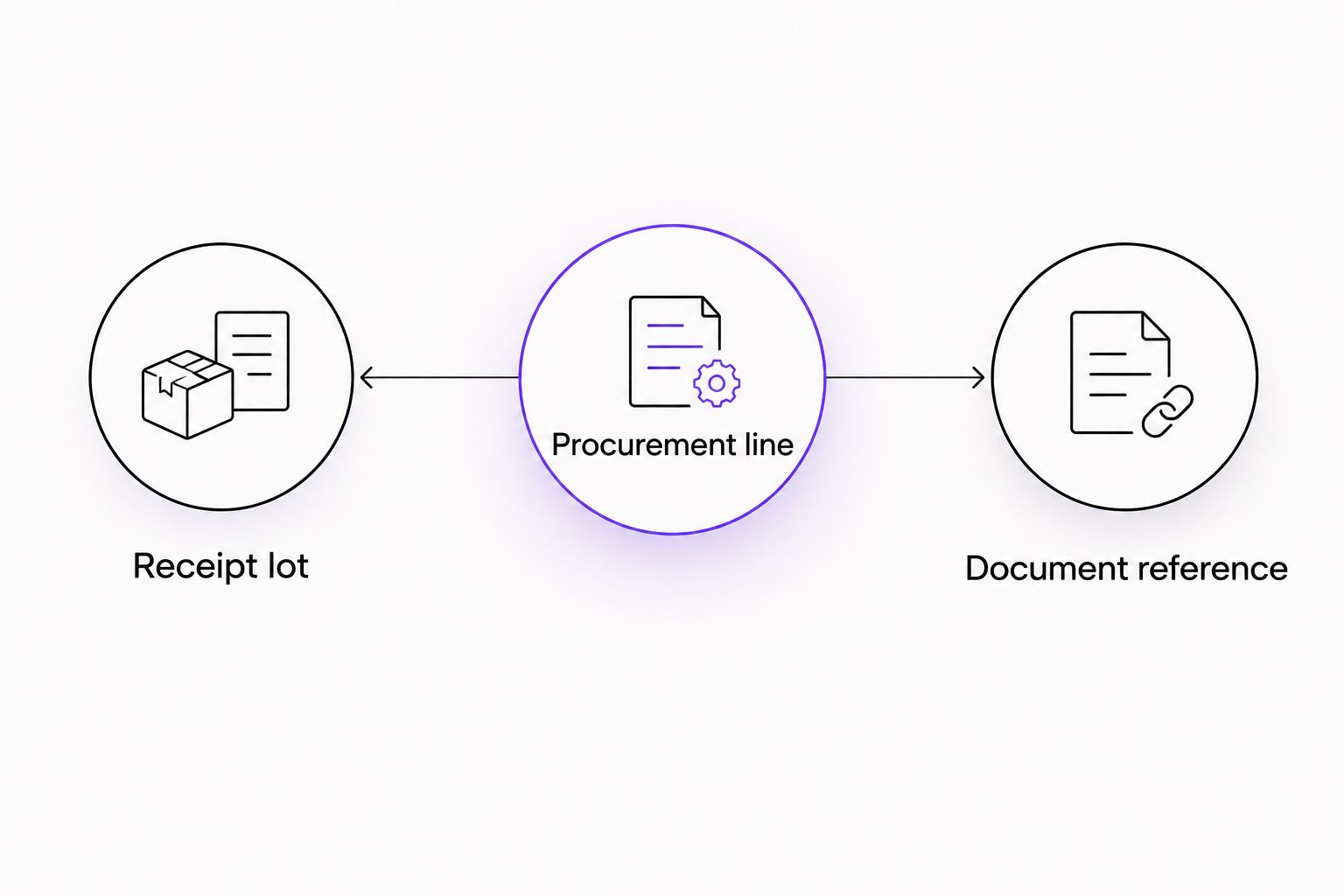
For example, 1 order line fulfilled across 2 batches requires separate batch-level receipt records. Preserve the parent order-line relationship rather than combining the batches under a single batch identifier.
Expected result: Every mapped value has an owner and validation rule, and an order line can remain unresolved without becoming accepted inventory.
Import validation and receipt review
Build a staging boundary
- Send incoming records to a staging area rather than directly to released inventory. Use the actual import controls documented for your LIMS; interface labels vary by system.
- Validate required identifiers, catalog matches, quantity formats, and units before creating destination records.
- Check whether the compound key already exists. Update the permitted purchasing fields on an existing record instead of creating another procurement line.
- Route missing identifiers, ambiguous material matches, and conflicting values to a review queue.
- Record the import outcome and destination identifier so the laboratory can reconcile the source with the LIMS.
Use 4 proposed staging outcomes: pending review, accepted for import, rejected, and imported. These are design labels, not supplier order statuses. Keep procurement acceptance separate from material release.
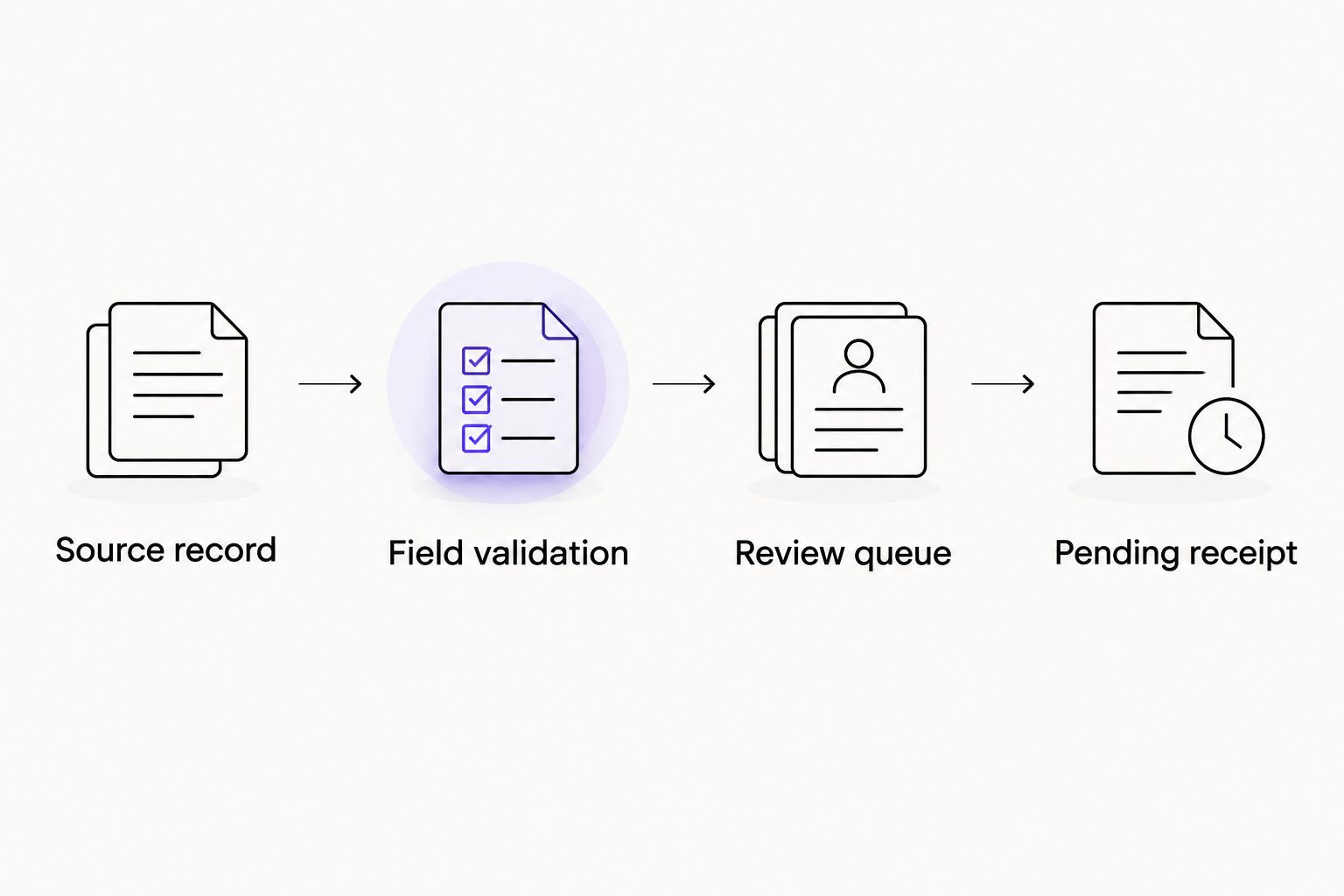
Test duplicates and partial failures
Submit the same approved test record twice. The second submission should reconcile to the existing procurement line rather than create a duplicate. Then test a missing material match and an interrupted transfer; both must leave an explainable result.
A 2026 acceptance record should identify the tested mapping revision, source example, expected result, actual result, and reviewer. Do not record only that an import succeeded: verify which destination records it created or changed.
Reconcile the physical receipt
Compare the received material identifiers and quantities with the purchasing record. Associate the observed batch identifier with the corresponding documentation, and retain discrepancies for review rather than silently overwriting the order.
A product description does not establish a batch's analytical characteristics. Record purity claims with their method, reporting basis, and source document when supplied; do not convert a chromatographic area percentage into a different purity measure.
Expected result: Replaying an import does not duplicate the order line, and incoming material remains pending until laboratory receipt and documentation checks are complete.
Order-update workflow
An update workflow is useful when your authorized source provides revised order information. It should change the purchasing record without rewriting laboratory observations.
- Locate the existing procurement line using its compound key.
- Compare only fields the source owns, such as the recorded purchasing status or ordered quantity.
- Preserve receipt quantities, observed batch identifiers, reviewer decisions, and retained documentation unless an authorized correction process explicitly changes them.
- Retain the previous value, revised value, source reference, and change time in the integration history.
For your 2026 mapping revision, define ownership field by field. A supplier-side cancellation can flag a purchasing exception; it must not delete material already recorded as received.
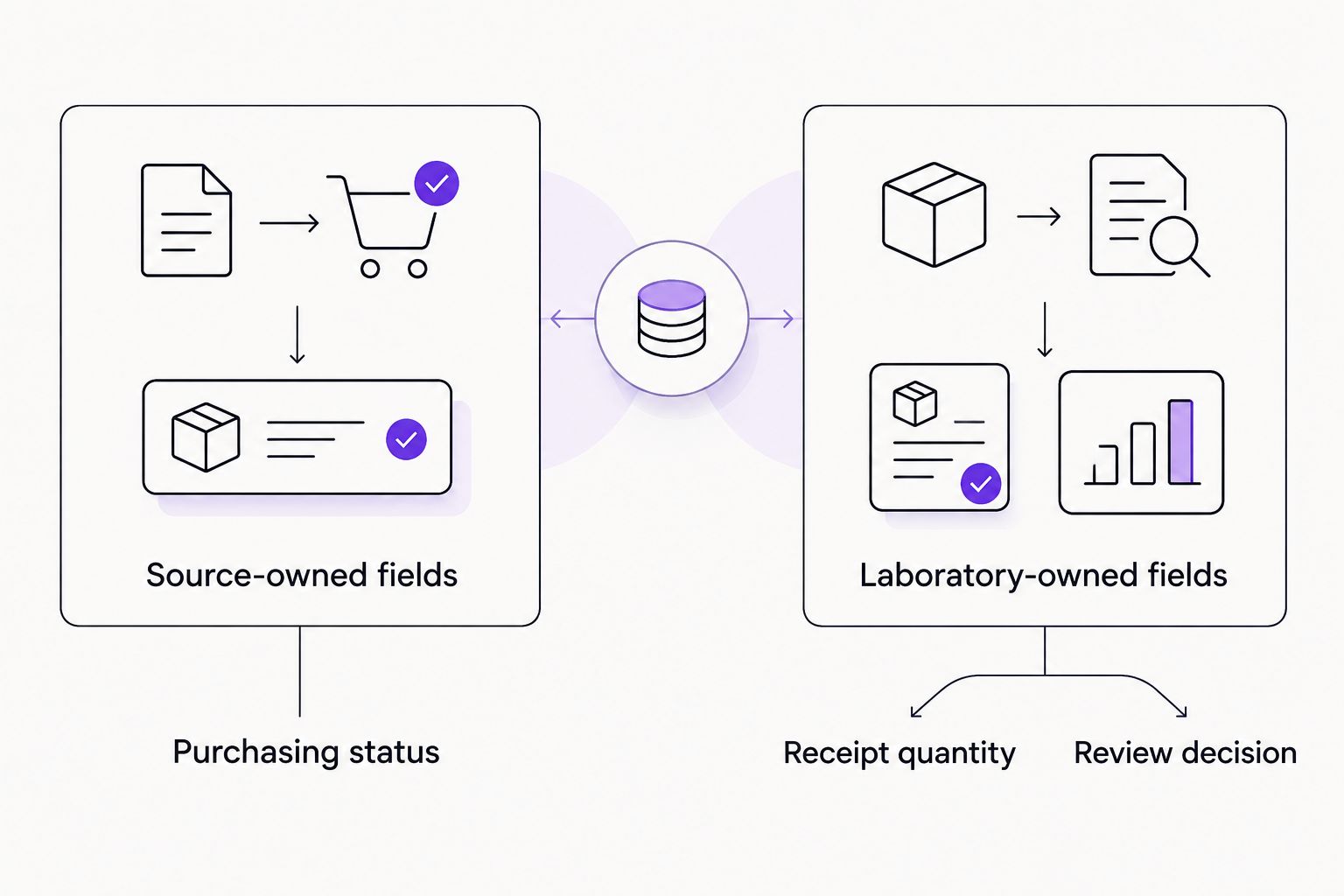
Expected result: Revised purchasing information reaches the existing record while laboratory evidence remains intact.
Troubleshooting
Repeated imports create duplicate lines
Check whether the integration matches on a display name, filename, or row position. Replace that rule with the controlled compound key, then reconcile existing duplicates through an approved correction process. Do not delete receipt history to make totals align.
Ordered quantities become received quantities
Remove the automatic field copy. Populate received quantity only through the receipt process, and make its unit explicit. A package count and a material quantity are not interchangeable.
A document appears against the wrong batch
Suspend the affected document association and check the material identifier, batch identifier, and source document together. Filename similarity is not sufficient evidence. Preserve the correction history rather than replacing the attachment without explanation.
An automated transfer fails authentication
Confirm that the integration uses expressly authorized credentials with the required scope. Distinguish customer-account access from store-management access, and never request broader privileges merely to bypass an error. Use the reviewed import route while access is resolved.
A source update overwrites a receipt decision
Stop automatic updates to laboratory-owned fields. Restore the correct value through the LIMS correction process and revise the field-ownership map before restarting the integration.
Customize your workflow
Once the basic connection is reconciled, extend it to document retention, laboratory project identifiers, and notebook references. Add one relationship at a time so each new destination remains traceable to the original purchasing record.
Keep credentials outside mapping files. Assign integration ownership to a laboratory role rather than leaving maintenance dependent on one person's account, and review permissions when responsibilities change.
For a 2026 maintenance review, repeat the duplicate-import and partial-failure tests after changes to the source format, mapping, or LIMS configuration. An unchanged file extension does not establish an unchanged schema.
Limitations
This guide specifies an integration design, not a verified native connector. It does not establish that 4-Amino-Labs exposes customer order exports, API credentials, webhooks, batch metadata, or automated document delivery. Confirm each required capability before implementing the corresponding route.
The workflow also does not establish material identity, analytical suitability, or compliance with a particular laboratory standard. Those decisions require the laboratory's own evidence, controlled procedures, and authorized review.
FAQ
How do I connect research chemical orders to LIMS without an API?
Use reviewed transcription or a structured-file import supported by your LIMS. Preserve the source record, validate the field mapping, and create pending procurement records before reconciling receipts.
Does a WooCommerce customer account provide API access?
A customer account does not establish permission to use a supplier’s store-management API. Obtain explicit authorization and documented access before building an API integration.
Can an order number serve as a batch number?
No. An order identifies a purchasing transaction, while a batch identifier identifies a material batch; retain separate fields and link them through receipt records.
How do I prevent duplicate LIMS records?
Match imports using a controlled key containing supplier, order, and order-line identity. Test the same record twice and confirm that the second import reconciles to the existing line.
Should imported orders automatically become released inventory?
No. An order import should create a procurement or pending-receipt record, with release reserved for the laboratory’s receipt and documentation review.
Can I attach a certificate of analysis during import?
Attach a certificate only when its material and batch association has been verified. Otherwise, retain it for review without treating the attachment as evidence of batch acceptance.
What should happen when an order changes after receipt?
Update source-owned purchasing fields without overwriting laboratory-owned receipt observations. Retain the change history and route conflicts through an authorized review process.
One last thing
Test a mixed-batch receipt before increasing automation. It exposes whether your integration understands the difference between purchasing identity and material identity—something a successful single-line import does not prove.
Related guides
- Connecting research chemical purchases to a lab notebook
- Verifying peptide purity with third-party COA testing
- Tracking cold-chain peptide shipping
Research use only. This content concerns laboratory procurement and data management. It is not medical advice and is not intended to diagnose, treat, cure, or prevent disease.
