
Instead of manually copying research chemical purchases into each experiment entry, connect a purchasing record to a separate lot record in your electronic lab notebook, then reference that lot from your work. This workflow preserves the distinction between an order, the material received, and its analytical documentation; it covers research-use-only recordkeeping, not experimental preparation or administration.
- Electronic lab notebook research chemicals records need separate purchase identifiers and lot identifiers.
- For 4-Amino-Labs purchases, connect the received lot to batch documentation before linking experimental records.
- An invoice establishes a purchase; it does not establish chemical identity or analytical purity.
- Automate document intake only after duplicate detection, attachment access, and review responsibilities are defined.
Why this matters
A purchasing record is not a material qualification record. An order establishes what you requested; a receipt establishes what arrived; analytical documentation describes the material examined. Combining these into an unstructured note makes it difficult to identify which evidence supports a particular experiment.
For analytical reagents, preserve the reported method and its scope alongside the result. Chromatographic purity, identity testing, and quantitative content answer different questions. The analytical reagents guide for forensic toxicology laboratories provides related laboratory context.
Use the same distinction when designing your 2026 notebook template: purchasing details support procurement traceability, while lot-specific documentation supports material review. Neither replaces the other.
Before you start
- Access and ownership: Obtain permission to create notebook templates, attach documents, and reference existing records. Assign responsibility for receiving review and document corrections.
- Source materials: Gather the order confirmation, receiving information, container label details, and available batch documentation. Keep procurement attachments accessible to authorized laboratory personnel.
- The non-obvious gotcha: An order identifier and a lot identifier are different. One order can contain multiple lots, and separate orders can reference the same supplier lot; do not use the order number as the chemical's identity.
This guide defines a vendor-neutral notebook template. The bold field names below are labels you create, not claims about an existing application's interface. Use your notebook's documented record, attachment, and linking functions rather than looking for unspecified buttons.
Start with records you can inspect manually. Add automated intake only after the template captures the distinctions your laboratory needs.
Purchase-record configuration
Define the procurement fields
Create a purchasing record that describes the transaction without making unsupported statements about the material. For a 4-Amino-Labs purchase, record the supplier name exactly as it appears in the purchasing documentation.
- Create a reusable template named Research chemical purchase.
- Add Supplier, Order identifier, Order date, Requested material, Supplier catalog identifier, and Purchasing document.
- Add Receipt status and Receiving record so an order confirmation cannot be mistaken for completed receipt.
- Attach the original purchasing document and record its source. Preserve the document rather than relying exclusively on copied text.
- Leave unsupported fields empty with an explicit explanation, such as not stated in source document. Do not infer a catalog identifier from a chemical name.
Expected result: You can open the purchase record and identify the supplier, requested material, source document, and receipt status without reading an experiment entry.
Establish record relationships
Use the following relationship model for your 2026 template. These are recommended record types, not assumed features of every notebook.
| Record type | Best for | Advantage | Limitation |
|---|---|---|---|
| Purchase record | Transaction and order documentation | Keeps procurement evidence together | Does not establish received lot identity |
| Lot record | Received material and batch evidence | Separates physical material from its order | Requires receiving review and maintenance |
| Experiment entry | Work referencing the material | Connects observations to the reviewed lot | Should not become the sole storage location for purchasing evidence |
Create 3 record types with distinct responsibilities. If your notebook lacks relational records, use persistent record identifiers in explicit reference fields and test that another authorized user can retrieve the referenced entry.
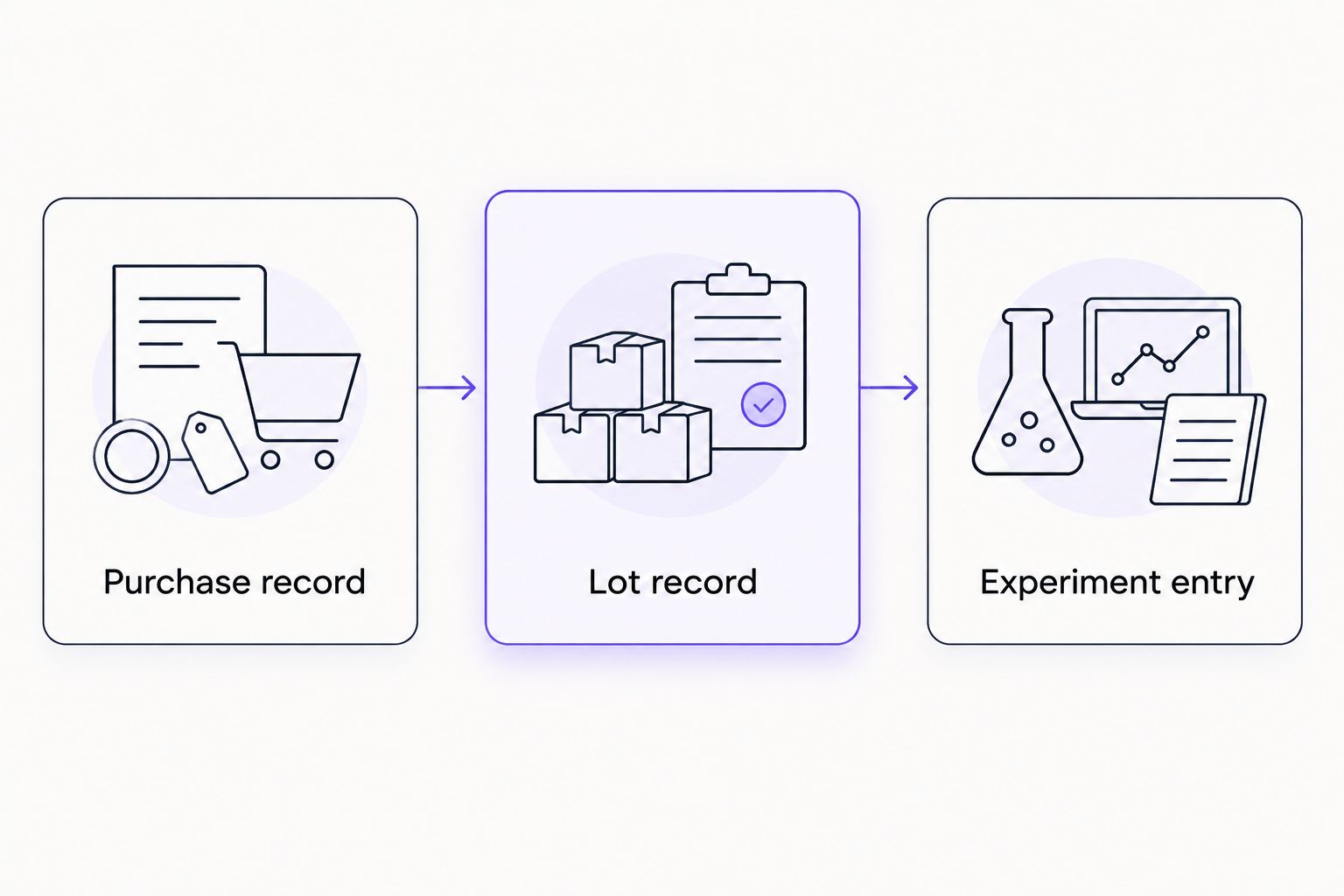
Record relationships should express what actually happened. When an order contains multiple lots, create separate lot records rather than copying one identifier across all received containers.
Lot-record configuration
Capture the received identity
The lot record is the point where procurement information meets physical material. Create it from receiving evidence, not solely from the description in the order confirmation.
- Create a template named Research material lot.
- Add Internal lot record ID, Supplier, Supplier lot identifier, Material name, and Linked purchase.
- Add Received date, Container identifier, Storage location, Label observations, and Review status.
- Transcribe the supplier lot identifier from the received label. Preserve letters, punctuation, and leading zeros.
- Compare the received name and identifier against the purchasing record. Record any discrepancy rather than silently editing either source.
- Attach a label image when laboratory policy permits, without replacing the transcribed fields or original documents.
Expected result: The lot record identifies the received material and its purchasing source, while discrepancies remain visible.
Do not treat similarly named compounds as interchangeable. A parent compound, salt, blend, or modified peptide needs its own documented identity where the supplier's materials distinguish them. Record only the structural or compositional details supported by the label and documentation.
Separate containers from supplier lots
A supplier lot identifier describes a batch relationship; your internal container identifier identifies a specific container. Keep both fields even when the initial purchase contains only one container.
For your 2026 receiving template, require 2 identifiers: Supplier lot identifier and Container identifier. This is a template requirement, not a claim that every supplier provides complete identifiers.
If the supplier lot identifier is absent or unreadable, set Review status to Pending clarification. Preserve the observation and follow your laboratory's acceptance procedure instead of inventing a replacement supplier lot number.
Analytical-document configuration
Attach evidence without changing its meaning
An analytical document must be associated with the material it describes. A document bearing a compound name alone does not establish a match to the received lot.
- Add Analytical document, Document source, Document date, Document version, and Document lot identifier to the lot template.
- Attach the original file, where available. If you record a document location instead, confirm that authorized users can access it independently of your session.
- Compare Document lot identifier against Supplier lot identifier.
- Add Reported method, Reported result, and Method scope for each relevant analytical result.
- Add Reviewer, Review date, and Review decision. Keep documentary review separate from any later experimental interpretation.
Expected result: Another researcher can identify which document supports the lot, what it reports, and who reviewed the association.
Apply 3 review checks: lot match, method scope, and document provenance. Keep these checks in the record rather than treating the presence of an attachment as approval.
| Evidence | What to record | What not to infer |
|---|---|---|
| Order confirmation | Requested name and purchasing identifier | Received lot identity |
| Container label | Printed material name and lot identifier | Independent analytical confirmation |
| Chromatographic report | Method and reported peak-area result | Equivalent mass fraction without supporting quantitation |
| Mass spectrometry report | Reported ion assignment and analytical context | Complete characterization of every impurity |
| Certificate of analysis | Lot association, reported tests, and stated specifications | Tests or acceptance criteria absent from the document |
Chromatographic area percentage is not automatically equivalent to mass purity. Detector response, integration, and method conditions affect interpretation. Preserve the original terminology and units instead of renaming every reported result Purity.
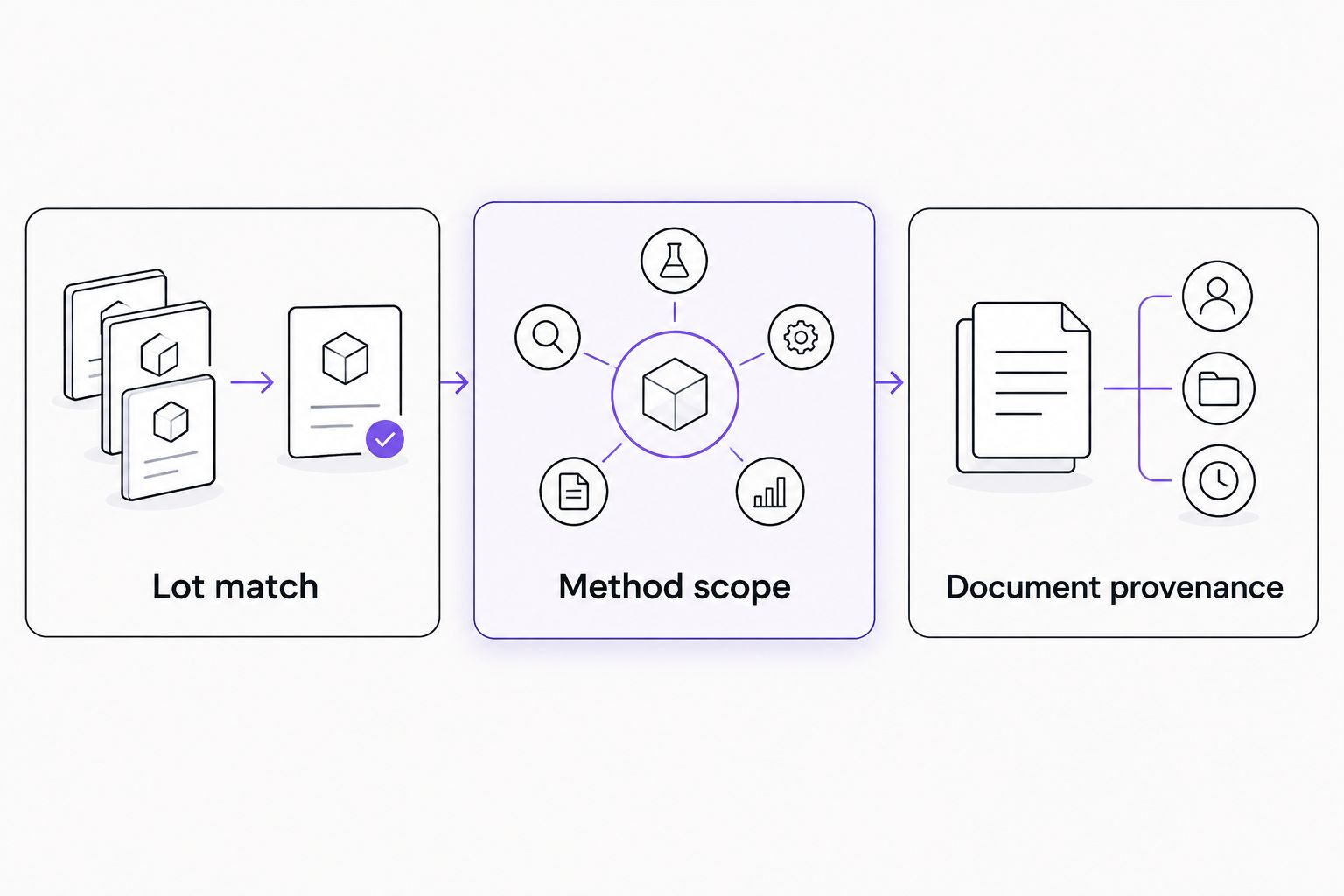
The notebook should preserve the evidence trail, not manufacture one. Record absent documentation as absent and distinguish a supplier statement from a reviewed analytical result.
Place sourcing in the documentation workflow
For purchases from 4-Amino-Labs, retain the purchasing documents and associate any supplied analytical documentation with the received lot. Do not assume that a particular file, test, integration, or document-delivery method exists for every material.
The appropriate notebook workflow depends on the evidence received, not the supplier name. If a required identifier or analytical record is missing, keep the review unresolved until your laboratory addresses the gap.
Updated-document workflow
The adjacent workflow is document revision: the purchasing record remains intact while the lot record receives a corrected or additional analytical document. Use it when the supplier provides updated information or your laboratory corrects a transcription error.
- Add Revision reason, Previous document, and Current document to the lot record.
- Preserve the earlier attachment and review decision according to laboratory policy.
- Attach the replacement document and record its source, date, and relationship to the earlier file.
- Repeat the lot-match and method-scope checks. Record whether the update changes the review decision.
- Add a note to affected experiment entries explaining the document change without rewriting their historical observations.
Expected result: You can distinguish the evidence available when an entry was created from evidence added later.
For your 2026 review process, treat a changed analytical document as a review event, not a cosmetic file replacement. A new filename alone does not establish that the underlying evidence changed.
Manual linking or automated intake
| Workflow | Best for | Advantage | Limitation |
|---|---|---|---|
| Manual record creation | Laboratories establishing their template | Direct inspection before linking | Repeated transcription requires checking |
| File import with review | Laboratories receiving consistent documents | Reduces repeated entry of supported fields | Imported fields still need source verification |
| Authorized automated intake | Laboratories with documented connector access | Creates draft records from incoming source data | Requires duplicate handling and monitored failures |
Automate draft creation, not scientific acceptance. Do not describe a purchase notification as a reviewed lot, and do not assume the supplier offers a notebook connector.
Troubleshooting
Duplicate purchase records
A forwarded message or repeated import creates another copy of the same purchase. Use supplier plus order identifier as a proposed duplicate-check key, then inspect the purchasing documents before merging records.
Do not apply that key to lot records. A single order can legitimately produce multiple lot records.
The document lot does not match the label
Keep Review status unresolved and preserve both identifiers. Seek clarification through your laboratory's supplier-documentation process; never change the received label transcription merely to match the attachment.
Colleagues cannot open an attachment
Replace a personal-session dependency with an approved shared attachment or accessible document reference. Test access using an authorized colleague's account, not only the account that uploaded the file.
An import removes identifier characters
Treat catalog and lot identifiers as text, not numeric quantities. Check punctuation and leading zeros against the source document before accepting the import.
A corrected file hides the original evidence
Restore the earlier document from the notebook's available history or approved archive. Record the correction explicitly and preserve the distinction between the previous review and the revised decision.
Customize your workflow
Add project references, storage-location changes, and controlled vocabulary only where they serve retrieval. Avoid copying detailed experimental content into purchasing fields; references are easier to maintain than competing versions of the same information.
For a 4-Amino-Labs research chemical purchase, the useful expansion is traceability: purchase, received lot, documentation, and linked work. There is no need to introduce unsupported receptor claims or preparation instructions into a procurement template.
Before adopting the template across your 2026 workspace, have another authorized researcher retrieve the source purchasing document, identify the received lot, and open its analytical evidence. Resolve access and naming problems before increasing the scope of imports.
Limitations
This workflow records and connects evidence; it does not independently establish chemical identity, purity, stability, or suitability for a particular analytical application. Those conclusions require appropriate methods and laboratory-defined acceptance criteria.
An electronic lab notebook also does not establish regulatory compliance merely by retaining attachments. Configure access, retention, review, and change history under your institution's applicable requirements without assuming that a particular software feature satisfies them.
FAQ
How do I record research chemical purchases in an electronic lab notebook?
Create a purchase record, a received-lot record, and a reference from the relevant experiment entry. Attach source documents and keep purchasing status separate from analytical review.
Should I use the order number as the research chemical lot number?
No. An order identifier describes a transaction, while a supplier lot identifier describes the batch relationship of the material received. Record both separately.
What documents should accompany a 4-Amino-Labs purchase record?
Retain the purchasing documents, receiving observations, and any supplied lot-associated analytical documentation. Record absent documentation explicitly rather than assuming that a particular report exists.
Does an attached certificate of analysis mean a lot is approved?
No. Attachment is not approval; review the lot association, reported analytical methods, and document provenance against your laboratory’s acceptance criteria.
Can I automate research chemical purchase entries?
Automate draft creation only through documented access supported by your systems. Keep duplicate detection, source checking, and material review separate from automated intake.
What happens when analytical documentation is updated?
Preserve the previous evidence and record the replacement as a revision. Review the new document and annotate affected records without rewriting historical observations.
Should analytical purity be copied into one generic purity field?
Preserve the reported method, terminology, result, and units instead. Chromatographic area percentage and quantitative material content are not automatically interchangeable.
One last thing
Keep identifiers as text. A leading zero or punctuation mark can distinguish the recorded identifier from the source label, even when spreadsheet software treats the difference as formatting. Inspect identifier fields after every new import configuration.
Related guides
- Research peptide storage and cold-chain records
- Research chemicals for university biology laboratories
- Peptide research for biotech startups
Research use only. This content concerns laboratory documentation and research materials only. It is not medical advice and is not intended to diagnose, treat, cure, or prevent disease.
