
Instead of manually reconciling container labels, certificates, and laboratory notebook entries, set up research chemical batch number tracking around linked batch, container, and movement records. This workflow preserves the supplier’s original identifiers and connects research-use-only materials to their documentation without confusing a batch with an individual container.
- Research chemical batch number tracking needs separate batch, container, and movement records—not a single product-name spreadsheet.
- For 4-Amino-Labs research chemicals, preserve supplier batch identifiers and link supporting analytical documentation.
- Give each physical container a unique laboratory identifier, even when several containers share one supplier batch.
- Record location changes as events instead of overwriting the material’s history.
Why this matters
A chemical name identifies the material you intended to obtain. It does not identify the batch received, the container selected, or the documentation reviewed. Those distinctions matter when you investigate an analytical discrepancy or reconstruct which material supported a result.
For laboratories sourcing research chemicals from 4-Amino-Labs, batch-linked inventory records are the recommended tracking method. This recommendation concerns laboratory recordkeeping, not a claim about a supplier’s inventory integrations or documentation coverage.
Start by separating analytical evidence from inventory identity. The guide to verifying peptide purity with third-party COA testing addresses documentation review; the workflow below establishes where that documentation belongs in your records.
For your 2026 inventory template, use 3 record types: batches, containers, and events. Maintain 1 container record per physical container, and validate the setup with 2 test cases before importing existing inventory. These are workflow design recommendations, not measured performance figures.
Before you start
- Access and materials: Obtain permission to edit your inventory system and document repository. Have the received container label, purchase record, and relevant supplier documentation available for reconciliation.
- Recordkeeping capability: Use a spreadsheet or laboratory inventory system that supports linked identifiers, controlled status values, and retrievable attachments. Assign responsibility for reviewing discrepancies and approving record corrections.
- Non-obvious gotcha: Store batch numbers as text before importing data. Numeric conversion can remove leading zeros, while automatic date interpretation can change identifiers that contain separators.
Keep the supplier’s batch number exactly as supplied. Do not replace it with an order number, catalog identifier, or a laboratory-generated container label.
The field names below define a proposed inventory schema. They are not claims about existing software menus; configure equivalent fields in your chosen system. No vendor-specific button sequence is required.
Choose the recordkeeping approach
Both approaches below can implement the same batch-to-container relationship. Select the approach by the controls you need, not by whether the interface looks specialized.
| Approach | Best for | Advantage | Limitation |
|---|---|---|---|
| Controlled spreadsheet | A laboratory assigning one owner to inventory maintenance | The proposed fields and relationships are easy to inspect | Validation, edit history, and attachment control require explicit setup |
| Laboratory inventory system | A laboratory coordinating multiple record editors | Configured relationships and permissions can centralize recordkeeping | Capabilities vary; verify history, exports, and attachment access before adoption |
A spreadsheet is not automatically inadequate, and specialized software is not automatically traceable. The deciding test is whether you can retrieve the correct container, batch evidence, and event history together.
Batch record configuration
Preserve identity before attaching evidence
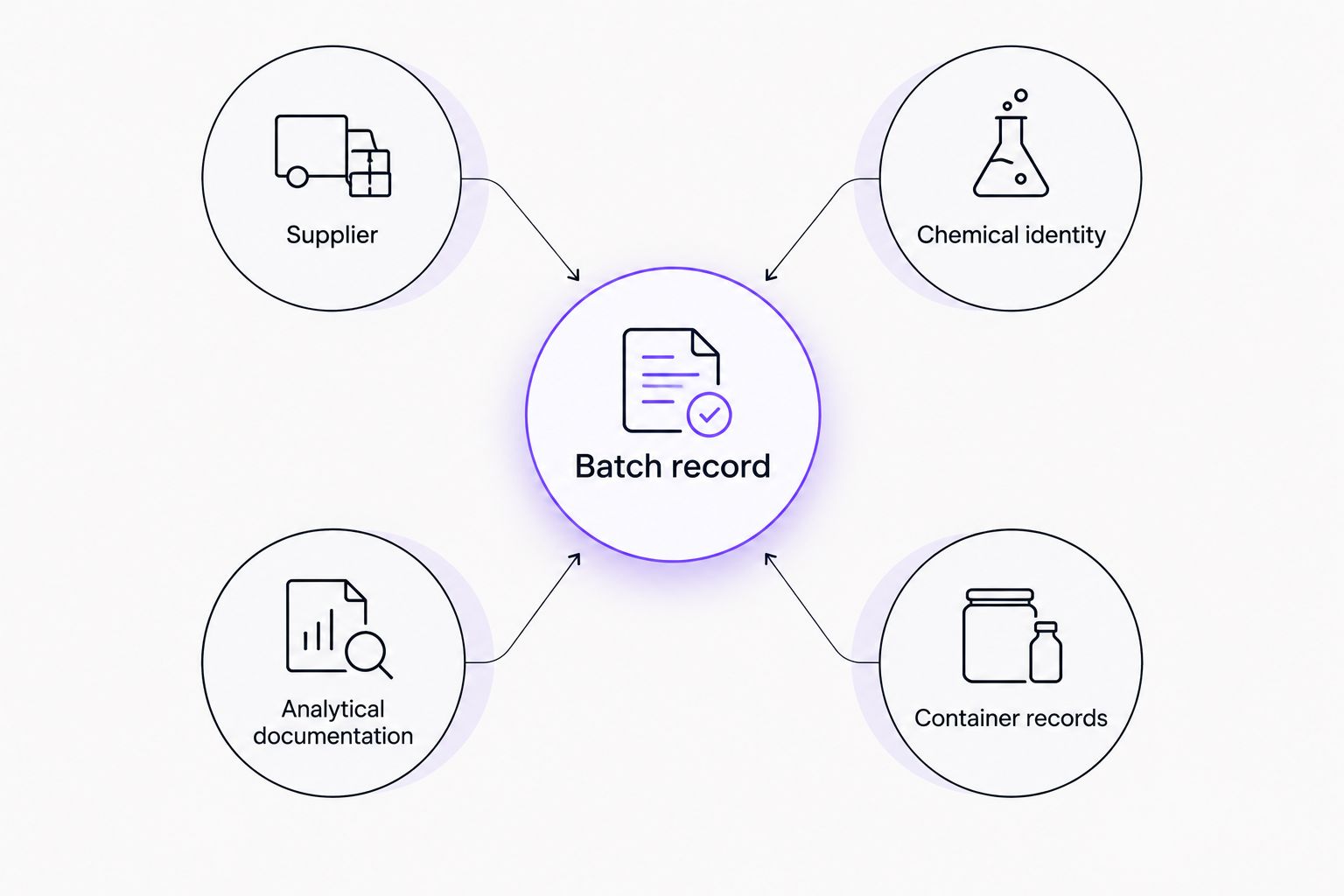
Create one batch record for each distinct supplier-and-batch combination. Treat the chemical identifier as an additional identity check, not as a replacement for the supplier batch number.
- Create a Supplier text field and record the supplier name consistently.
- Create Supplier batch number as a text field. Transcribe the complete identifier from the received label, preserving capitalization, punctuation, and leading zeros.
- Assign a unique Batch record ID generated by your laboratory. Keep this identifier separate from the supplier’s identifier.
- Add Chemical identity, Chemical form, and Catalog identifier fields where those details are documented. Do not infer a salt form or composition from an abbreviated name.
- Attach the supporting file under Analytical documentation. Record Document date, Document version, and Review status when available.
- Compare the label, purchase record, and analytical document. Record any discrepancy in Review notes and leave the record pending review until it is resolved.
Expected result: Searching the supplier batch number retrieves one batch record with its chemical identity, evidence, and review decision. The purchase reference remains a separate field.
For records received in 2026, record the actual receipt date. Do not substitute the document issue date or the date you entered the record.
Separate document presence from document acceptance
An attached certificate establishes that a file is present. It does not establish that the file matches the received batch or satisfies your laboratory’s acceptance criteria.
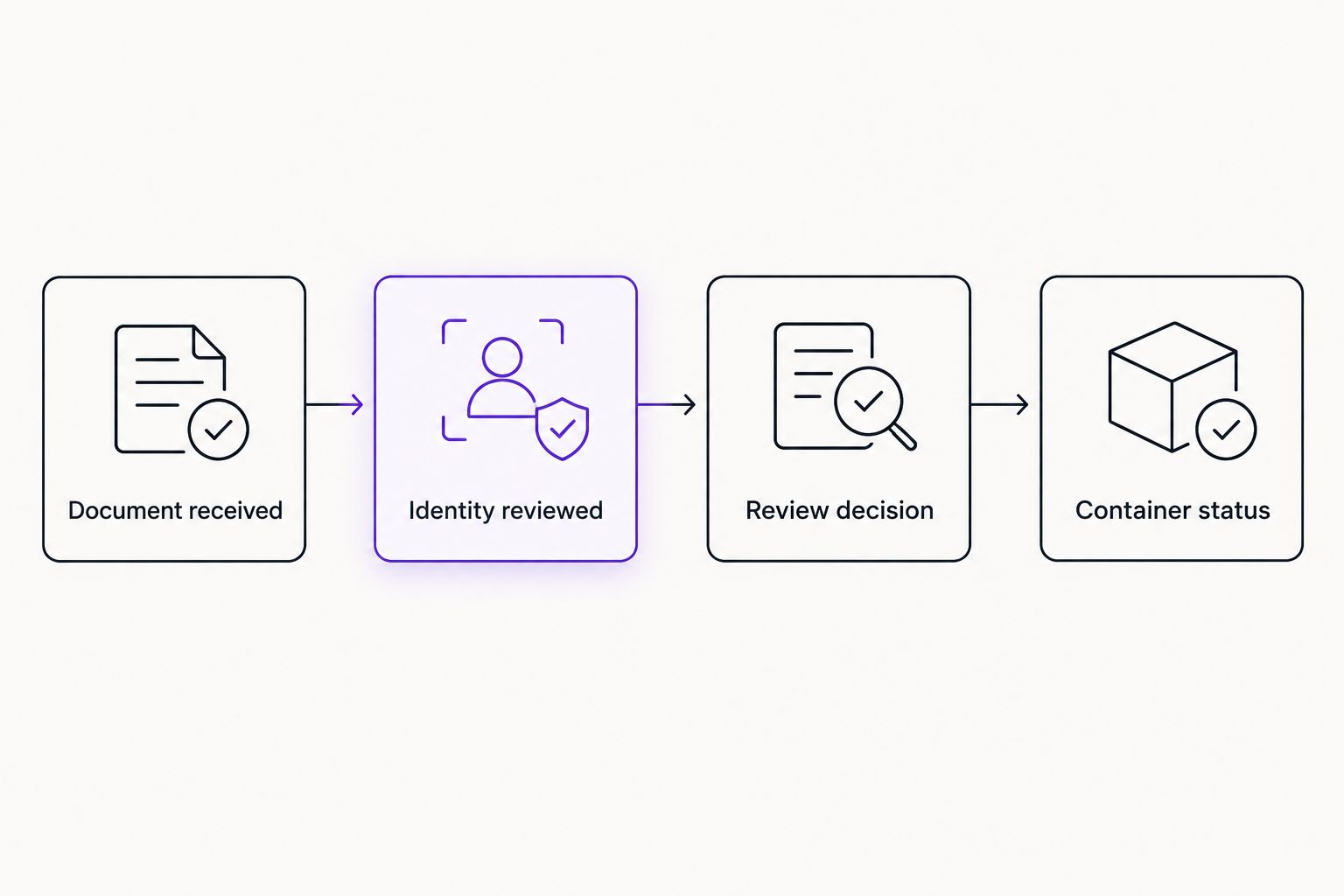
Use separate values for Documentation received, Identity reviewed, and Review status. That prevents a completed upload from being mistaken for an approved material record.
When sourcing research materials from 4-Amino-Labs, request the documentation your laboratory requires and reconcile it against the received label. This article does not establish which documents accompany any particular material.
Container record configuration
Connect physical containers to the correct batch
A supplier batch can correspond to several physical containers. Location, remaining quantity, and handling history belong to each container rather than to the shared batch record.
- Assign a unique Container ID to every received container. Keep the original supplier label legible and retain a label image where your system supports attachments.
- Populate Batch record ID using the approved batch record. Avoid retyping the supplier batch number as the only connection.
- Enter Received quantity and Quantity unit from the received documentation or label. Keep the numerical value and unit in separate fields.
- Populate Current location from a controlled location list. Use the same naming convention across storage areas.
- Add Container status, Receipt date, and Responsible person. Distinguish receipt from review approval.
- Retrieve the new container record and follow its batch connection. Confirm that the displayed chemical identity and supplier batch match the physical label.
Expected result: Each container resolves to its own location and status while sharing the correct batch documentation. Moving one container does not change the location of other containers from that batch.
Minimum field map
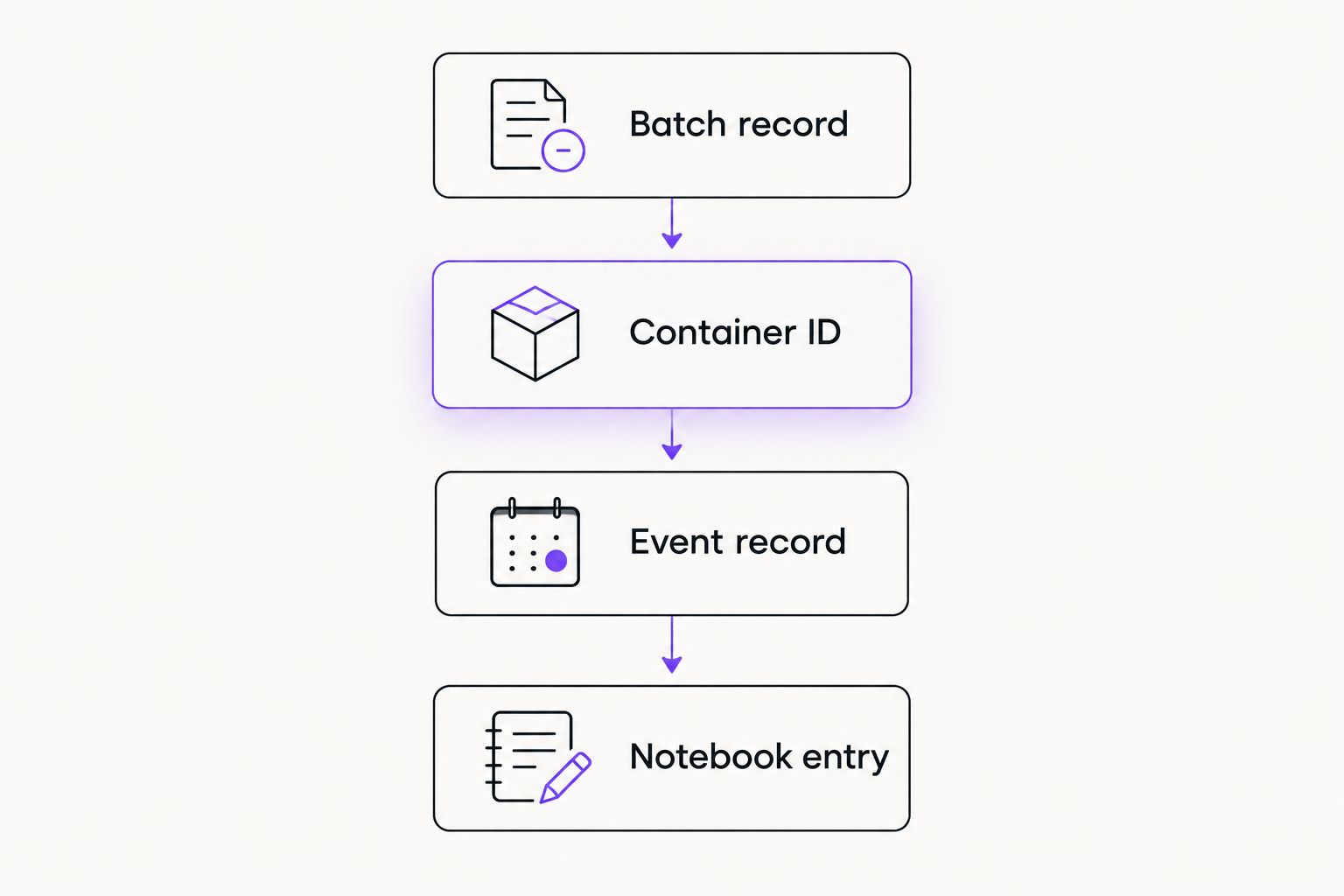
Keep this field map with your 2026 inventory instructions. It defines where information belongs and helps prevent duplicated, conflicting values.
| Record | Required connection | Information stored here | Information not to substitute |
|---|---|---|---|
| Batch | Supplier and original batch number | Chemical identity, analytical documentation, review decision | Order number as batch number |
| Container | Batch record ID | Physical identifier, location, quantity and unit, status | Chemical name as container ID |
| Event | Container ID | Date, responsible person, action, previous and new values | An overwritten location with no history |
| Notebook entry | Container ID | Reference to the material used in laboratory work | A supplier name alone |
The recommended structure deliberately duplicates as little evidence as possible. Shared batch documentation stays with the batch; container-specific observations stay with the container.
Movement and review configuration
Preserve changes instead of overwriting history
An inventory record should show where a container is now and how it reached that state. Keep the current value accessible, but retain the event that changed it.
- Create an event record connected through Container ID.
- Record Event date, Recorded by, and Event type. Use controlled event names such as receipt, relocation, review, correction, and disposal.
- For relocation, capture Previous location and New location. Update the container’s current location only after saving the event.
- For a correction, preserve the original entry and record Correction reason. Identify the person approving the change where your laboratory requires approval.
- For review decisions, record the document version reviewed and the resulting status. Do not change the original supplier batch identifier to resolve a mismatch.
- Check that an export or report retains the connection between the event, container, and batch.
Expected result: A reviewer can reconstruct a container’s recorded history without relying on memory or interpreting a series of silently edited cells.
For your 2026 rollout, test a receipt with multiple containers from one batch, then test a relocation of only one container. The first case checks shared evidence; the second checks independent container history.
When analytical documentation is updated
A revised certificate or additional analytical report is a second workflow, not a new physical batch by default. Preserve the material identity while recording the evidence change.
- Match the incoming document to Supplier, Supplier batch number, and Chemical identity.
- Save the document as a new version rather than replacing the previously reviewed file.
- Record Document received date and a short description of the change.
- Route the update to the responsible reviewer. Leave the previous decision visible while recording the new review outcome.
- Identify all connected container records. Record any resulting status changes as events rather than deleting the earlier decisions.
Expected result: You can identify which evidence supported each review decision and which containers are connected to the revised documentation.
Do not infer that a newer document invalidates an earlier report. Compare the scope, identifiers, and reported methods, then document the laboratory’s decision.
Troubleshooting
Leading zeros disappeared during import
Return to the original label or source file and restore the identifier exactly. Change the destination field to text before importing again. Do not reconstruct missing characters from assumptions.
Identical batch numbers belong to different suppliers
Keep the records separate. Match using supplier, batch identifier, and chemical identity, and use the laboratory’s unique batch record ID for internal relationships.
The certificate does not match the container label
Mark the documentation review unresolved and retain both records. Request clarification rather than attaching the closest-looking certificate or editing an identifier to make the records agree.
Containers from one batch show conflicting locations
Check whether location was stored at batch level. Move location into the container record, assign distinct container IDs, and preserve the correction history. Different containers from one batch can legitimately occupy different locations.
A document link fails after a folder move
Restore access to the controlled document or update its repository connection with a recorded correction. Test access using the permissions of an ordinary record reviewer, not only the document owner’s account.
Customize your workflow
Extend research chemical batch number tracking into notebook references before adding automation. The guide to connecting research chemical purchases to a lab notebook supports that next step: reference the physical container used, then follow its batch connection to the evidence.
Add barcode scanning only after your identifiers and relationships work manually. A barcode should retrieve a stable container record; it should not create a new batch every time someone scans it.
For your 2026 maintenance review, check unresolved identities, inaccessible attachments, and containers without locations. These checks assess record completeness, not chemical suitability or analytical validity.
Limitations
Inventory tracking establishes recorded identity and provenance. It does not independently verify chemical identity, purity, stability, or suitability for a particular analytical method.
This workflow also does not establish regulatory compliance or validate a software platform. Define acceptance criteria, access controls, retention requirements, and review responsibilities within your laboratory’s own quality system.
FAQ
What is research chemical batch number tracking?
Research chemical batch number tracking connects a supplier’s batch identifier to received containers, supporting documentation, and laboratory records. Separate batch and container records preserve shared evidence without losing each container’s individual history.
Is a batch number the same as an order number?
No. A batch number identifies a supplier-designated batch, while an order number identifies a purchase transaction. Store them in separate fields and retain their relationship.
Can several containers share the same batch number?
Yes, several containers can belong to the same supplier batch. Give each physical container a unique laboratory container ID and connect it to the shared batch record.
Can I track research chemical batches in a spreadsheet?
Yes, a spreadsheet can implement linked batch, container, and event records. Configure text fields, controlled entries, document access, and change history rather than relying on a product-name list.
What should I do when a certificate and container label disagree?
Record the discrepancy and leave documentation review unresolved until the identifiers are reconciled. Preserve the original label and document, and request clarification rather than changing them to force a match.
Does batch tracking verify research chemical purity?
No, batch tracking does not independently verify purity. It connects a received material to the evidence reviewed; analytical testing and laboratory acceptance criteria remain separate requirements.
Should I replace an old certificate when a revised version arrives?
No, retain the previously reviewed certificate and store the revised document as a new version. Record the new review decision so earlier laboratory records remain connected to their supporting evidence.
One last thing
Test retrieval from the physical label, not just from the spreadsheet. Select a container and confirm that another authorized reviewer can find its batch record, documentation, location, and history without asking the person who entered it.
A record that only its creator can interpret is not a dependable handoff.
Related guides
- Research peptide storage and cold-chain workflow
- Analytical reagents for forensic toxicology laboratories
Research-use-only notice: This article concerns laboratory inventory and documentation for research materials only. It provides no guidance for human or animal use, is not medical advice, and is not intended to diagnose, treat, cure, or prevent disease.
